
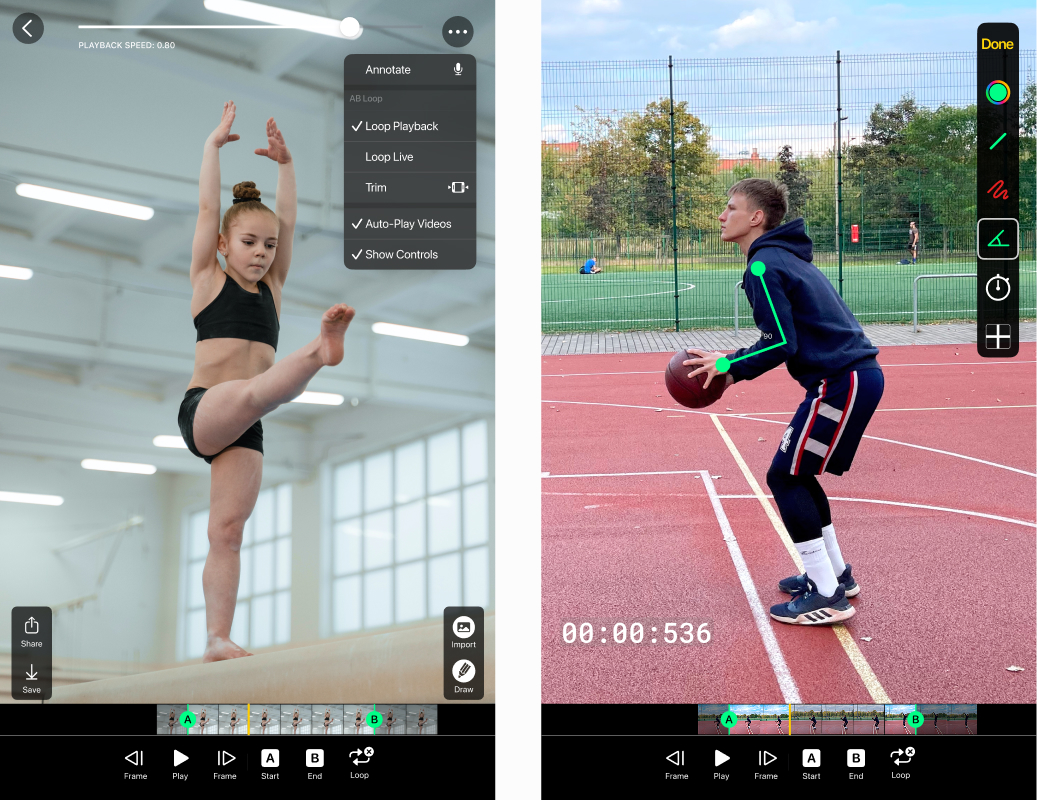
A video replay app lets athletes and coaches watch an action again right after it happens. No camera operator, no scrubbing through footage, no interrupting practice. The rep plays back on screen seconds after it happened, and you can slow it down and study it on the spot.
Video Delay Instant Replay is a video replay app built for exactly this. It combines a delayed live feed with a full replay screen, so instant replay happens automatically and deeper review is one tap away. The iPhone and iPad app is the most complete version, and our Android apps cover the delayed view, slow motion, and recording.
Instant replay without pressing record
Classic video review means recording clips, stopping practice, and finding the right moment in the footage. A replay app built on a delay buffer skips all of that. The app continuously captures what the camera sees, shows it on a delay you choose, and lets you open a replay of any moment in the buffer. Pause it, play it in slow motion, and step through frame by frame to see exactly where the elbow dropped or the knee caved.
Practice never stops while you review
The detail coaches ask about most: what happens to the next athlete while you are studying a replay? In Video Delay Instant Replay, the buffer keeps capturing while a replay is open. The rest of the line keeps hitting, jumping, or swinging, and their reps are recorded and ready to review next. Most delay apps cannot do this, which is one of the main differences covered in our comparison with BaM Video Delay.
A brief history: when instant replay needed a truck
Instant replay began in television. The 1963 Army Navy game is usually credited as the first live instant replay broadcast, and for decades replay stayed something only a production crew with tape machines could do. Sports facilities that wanted it for training copied broadcast on a smaller scale: a camcorder feeding a hard drive recorder in chase playback mode, wired to a TV on a cart, or a permanently mounted replay system in the batting cage.
Those rigs proved how valuable seeing yourself immediately is, and how annoying the hardware was. A modern replay app collapses the camera, the recorder, and the screen into one device you already own, and adds things the cart never had, like frame by frame stepping and automatic capture that never stops.
Compare angles and go big screen
Split screen shows two views side by side, and a second iPhone or iPad can act as a synced second camera, so both angles move together during replay. For team review, send the picture to a TV or projector over AirPlay or HDMI and the whole group can watch.
Use a better camera when you need one
The built in camera covers most training, and the app records up to 2K, with 240 fps slow motion at 1080p for fast movements. When you need a different viewpoint, connect a GoPro (Hero 10 and newer), a DJI Osmo Action, a USB capture device, or an IP, NDI, or RTMP stream. Details in the external camera guide.
Save and share replays
Recordings export as standard MP4 files, so a good rep goes straight to the team chat, Instagram, or TikTok without conversion.
Get the video replay app
On iPhone and iPad, Video Delay Instant Replay is a subscription app, and you can try it free before subscribing, with no payment details and no auto renewing trial to cancel. Download it on the App Store.
On Android, Video Delay Instant Replay CAM is free to download and Video Delay Instant Replay PRO is a one time purchase. See the Android options to compare them.
Video replay app FAQ
Can I slow a replay down?
Yes. Replays play in slow motion and can be stepped frame by frame. Capturing at 240 fps keeps fast movements smooth when slowed down.
Can I save and share a replay?
Yes. The app records and exports MP4 files that play anywhere.
What is the difference between a video replay app and a delay camera?
A delay camera shows the feed on a fixed delay automatically, while a replay app adds controls for pausing, slow motion, and frame stepping. Video Delay Instant Replay combines both.
Does it work for team practice?
Yes. Capture continues while a replay is open, so one athlete reviews while the others keep going, and an external screen lets the whole group watch.